Spotify Answers our Prayers: the Spotify iPad app!

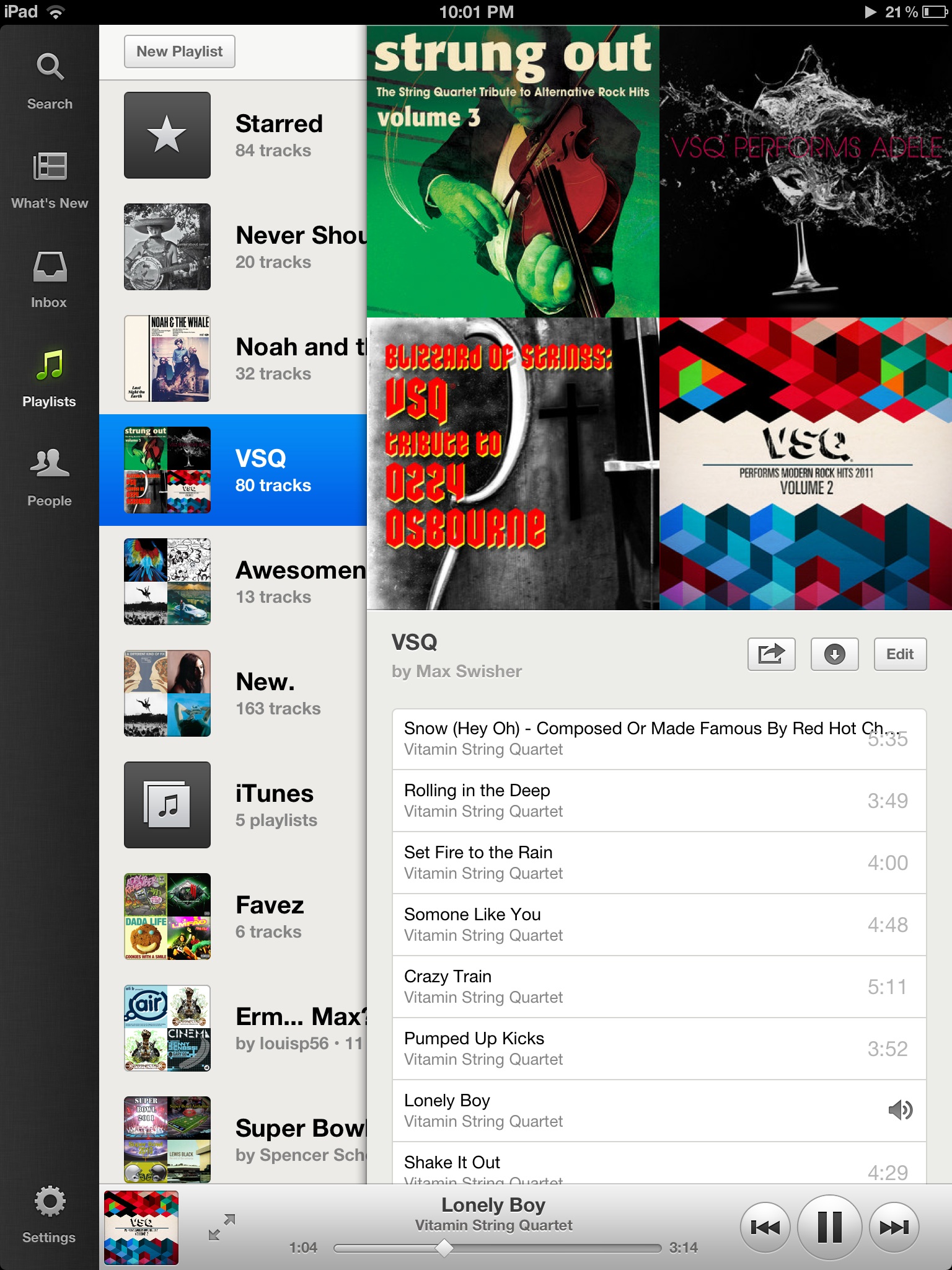
Look at the beautiful artwork!

It’s about time.

I have been craving this exact item on the menu for the longest time, and finally Spotify has granted our wishes.

Previously, it was necessary to use the iPhone application on the iPad, which was disappointing as spotify could have done so much more with the large screen real estate.

The new iPad Spotify app is really the new Android Spotify app‘s older brother. It features a similar interface with  all of your standard Search, New, Inbox, and other menu functions in a left menu. It is also similar to the Facebook and Twitter iPad apps thanks to it’s clean, sliding panels.

Spotify integrates a lot of album artwork, with their signature two-by-two paneling of playlist album art.

If you want Spotify on your iPad, it is a free update for those who had the iPhone app installed previously, or you can go to this iTunes store link.

Thank you Spotify!

Spotify for Android gets Overhauled

Pretty new artist page

Spotify is by far the best music service I have ever come across. For $10 a month, I get all of the new songs streamed to my computer and phone. For the price of one album a month, I can have as many songs and listen to all of them as many times as I want without any ads or issues. It’s magical!

The only problem is the the android app. It really lacks – the interface is a little bit hard to use, it doesn’t offer as much functionality as the desktop app, and the graphics are quite low resolution.

Well, not anymore. Spotify has released a preview of their new app, which features facebook- and twitter-like slide-out menus, cleaner, easier graphics, and a nicer, more refined playing menu. The interface is also a lot faster in general.

A nice new player interface

The application isn’t available on Google Play quite yet, as they’re working on adding a few more features like Last.fm scrobbling, folders, and more. However, if you’d like to update now, you can still download the preview of the new app.

First, you’ll need to open Settings > Applications and check the box that allows you to install applications from unknown sources. Next, open this post on your phone and tap here. The apk file should download. Next, pull down the notifications and tap the downloaded file. Follow the steps and in a few taps you’ll be enjoying the new spotify interface!

I’m excited that spotify is finally cleaning up their Android app – it was getting a bit, well, old.

Instagram for Android

Finally. At long, long, long, long, long, long, long last. Instagram has released their official Android Application.

In case you don’t know, Instagram is a photo-sharing platform which incorporates different fun-style effects and third party sharing into the mix. It’s been available for the iPhone since late 2010 and has collected over 30 million users. Yeah. Whow.

There were many speculations of an Android App over the past while, but no confirmed release date.

Now that Instagram has released their Android version, they are well on their way to a giant user base. After all, Android does have more of a market share than the iPhone.

As far as the application goes, it’s the exact same as the iPhone with one important exception: The android application does not have the tilt-shift function, a popular option among Instagrammers. (Tilt-shift is where a selected part of the photo is in focus and the rest is not.)

If you are an android user longing for some instagrammal love, click here to download the free app for android. Enjoy!

Google Ditches Android Market for Google Play

Play logo

Android Market, the typical android counterpart to iOS. Widely used, known, and enjoyed.

Recently, Google added Movies, Music, and Books to the Market. Thanks to the general nature of the word Market, no name change was necessary.

All of your music showed up in the separate Google Music app. Your movies in the Google Movies app. Simple enough, right?

Google disagrees.

Google has completely ditched that entire scheme around a new name: “Google Play”. Google Play is the new name for the Android Market, while the Google Music app has changed to “Google Play Music” and movies changed accordingly to “Google Play Movies.”

Honestly, it’s nice that they’re congregating all of their purchases under one name, however “Google Play Movies” sounds like someone with awful grammar trying to say Google Plays Movies. I think they just need a semicolon – Google Play: Movies… actually, no. They just should have gone with something other than Play.

The new logo and name are all that has changed – the general interfaces are still identical, so nobody needs to freak over yet another interface change. However, it’s still a bit annoying that Google decided to mix everything up – all at once – and will probably manage to confuse a lot of people in the process.

Otterbox Defender Series for Galaxy Nexus

Over my years of reviewing and testing, no other case company has ever been able to  replicate the protective properties of Otterbox’s cases. When I plan on dropping my phone off of a two story building, they’re the only ones with a case I can trust.

That’s why when I got my Galaxy Nexus, I knew that the case I would be getting would be from otterbox. Here’s my scoop.

Design

The case consists of two main parts: an outer silicone skin, and an inner hard plastic shell (with a screen protector built in).

The outer silicone skin has a nice grip and absorbs a majority of the initial shock if you happen to drop the device. It has openings for all ports, so you can attach everything you need without having to ever remove the case. This is a nice feature, although it does add more parts and complexity to the overall design of the case.

The Flaw

The inner shell is the hard layer of protection for the device. It has two parts: a bottom and a top section, which snap around the phone. This is where the only problem with the case is.

A "practically indestructible" case?

The top section is a frame around the screen (with openings for speakers, cameras, lights, etc.) which also has a screen protecter glued in. This means that you need to clean off the screen protector of the case in addition to your phone’s screen and try to get them together before any other dust settles. The only issue with this is that if any dust settles after you’ve snapped it on, good luck getting it off – without breaking it, that is. After my first attempt at putting it together, I noticed a bunch of dust particles under the protector. So I take the case off, but the tiny snaps on the edges that hold the case together aren’t willing to let go. In the end, I need to pry them apart to even get to my phone. This bent the frame a bit. On my second attempt at taking the case off, I tried to use a key in the tiny slots next to the snaps. I ended up cracking the frame, and it still took a good ten minutes for me to get the case off of the device.

Conclusion

Otterbox was always (and most likely will always be) known for it’s super-protective lines of cases. At $50, the materials are not very well-built and are extremely prone to cracking and bending. Although it may protect your device, the case is oddly fragile for its super-hefty title. I can’t say I don’t recommend this case, as the protection it offers is above-par, but I can’t highly recommend it as it is fragile and the plastic materials are prone to breaking and bending.

If you want to pick one up for yourself, click here to be redirected to the Otterbox page.

P.S. Thank you otterbox for sending me this awesome (but fragile) case!

Bananapress: a super-simple CMS

WordPress is wonderful. People love to use it, and some extremely beautiful and large sites implement it as their backend.

But then there’s those who get tired of wordpress. It works, well, yes. But it is a bit heavy, it can be a bit slow, and it’s not the lightest thing in the world.

So you try our Drupal, but that’s just disgusting – the interface is impossible to use, it has high requirements, and the error messages are nearly indecipherable.

There’s plenty of other CMSes, but they’re all a bit blech. So I decided hey, why don’t I just make my own?

That’s why I made bananapress. It started as just for personal use, then I realized that I could easily create an installation script and make it open source for all of you to use.

Bananapress is a bare-bones simple CMS. It only requires PHP v5.2 and a MySQL Database. Unzip the file, put it in the root of your domain, then go to http://yourdomain.com/install. It will give you instructions on editing the config.php file (I’m hoping to make that webpage be able to edit the configuration file, but I’m not familiar with write and reading text files in PHP). Put in your database information in the config file, then click next on the install page. It should configure a database for use with your site.

Now, you can go to http://yourdomain.com/login.php, enter the password that you entered in the config file, and write and save your first post. Voila, it should show up on your homepage.

And that’s it! I’m working on getting an editing page and some more documentation for it, but it’s a work in progress. So far the feedback has been good.

Feel free to check it out for yourself by going to http://bananapress.co.cc !

Why Google+ Is Failing

When I was at the Teens In Tech conference, a speaker told me this:

For your product to succeed, it either must be a new idea or be better than a previous one.

It makes sense – why would anyone switch to your product if there’s already one that does the same thing? Your product needs to have more to offer so people would actually have a reason to “convert.”

Unfortunately, there are few tech companies that succeed with new ideas – so a lot take old ideas and refresh them to make ‘em better. For example, every Apple product ever created; The iPhone wasn’t the first phone in the world – it was just better than the rest; The iPod wasn’t the first small music player ever created – it was just better because it could hold so many more songs and didn’t need CDs or Cassettes.

Okay, so lets take a look at Google+. It’s a great social network that has tons of new features that are definitely in demand. Who would wan’t multi-person video chat, along with a slew of easier to manage privacy features?

“Okay, so Google+ “better” than facebook – but why isn’t it succeeding?”. This is a question I’ve been asked many times.

Lets think about it in terms of a lamp (yes, the one on your desk). First, we have our facebook: A standard lamp with a normal switch that emits very bright light. Then, lets look at our Google+: A large, fancy lamp with pretty designs on it, a bendable neck, and voice activated controls – but we forgot to add in a socket for a lightbulb.

In this analogy, our Google+ Lamp is “better” than our facebook lamp – but it doesn’t do what people want to use it for (illumination).

Lets take that analogy back to Facebook and Google+. What is the real reason people ever go on facebook?

The real reason is their user base. There are very very few people who aren’t on facebook, and there are very very few people on Google+. Google+ has all the new doohickeys and thingamajigs, but it’s forgetting the light bulb (user base).

And because nobody is on Google+, nobody wants to join – they’re satisfied with Facebook and their 1500+ “friends.” What’s the use of having a ten person video chat if there’s not even ten people on Google+?

Google+ is a good idea, with a perfect execution – but the social networking field has been completely dominated by Facebook and Twitter. It’s unfortunately like this for many social internet startups: many of them rely on a user-base to be the least bit useful, and without a user base you won’t be able to expand your user base. You can get a user base by having a user base, because if you have a small user base people want to join to be part of that user base, which makes more people want to join etc.

Hence the reason most social startups fail. Gaining a user-base is a domino effect, with the first domino being a giant brick wall. You need to hope that something will come and knock it over, as getting the domino train started is definitely the hardest aspect of the whole process.

How-to: Hack the Apple Smart Sign

My friend Amit and I set all of the Smart Signs to GMG!

If you were recently at an Apple Store, you may have noticed their new “Smart Signs.” These are iPads that have information about the Apple product you’re looking at, however these iPads are locked in the smart sign mode. The iPad’s physical buttons are embedded into the plastic stand, and the home button has been disabled.

Sources say that there is a “secret gesture” that gets the iPads out of this mode, but after a ton of online research and asking many different Apple store employees, I still couldn’t figure it out.

So I went the easier way – I had to figure out a way to push the buttons.

I pushed as hard as I could on the edge of the iPad’s bezel, and this activated the lock button in the top right and locked the iPad. The plastic of the stand pushed against the button, so I wouldn’t be damaging any of the inside contents.

After I successfully locked the smart sign, I turned it back on and I was greeted with the lock screen. However, after unlocking the iPad I was returned to the same Smart Sign mode. Darn.

So instead of just locking it, this time I held down the bezel and got the “Slide to Power Off” slider. I swiped across, let it shut down, then held down the bezel to reboot it. (Check out the video at the end of the post for more detailed instructions.)

Tada! The iPad booted into its normal mode, and I was able to open the default applications and such. Unfortunately, the Home button is still disabled – so if you open an app, you won’t be able to get out of it without rebooting the iPad.

While we were at it, my friend/helper Amit decided to help me out and assisted me in setting every smart sign in the Apple Store to Good Morning Geek. Because the home button was disabled, the customers either had to browse my site or scroll up and find the URL bar. Also, the screens are set to never turn off – also handy!

By the time we were done, an Apple Store employee came up to us and nicely said “Would you guys please stop messing around with the smart signs?”

In the end, it was really fun. I tried to jailbreak it with jailbreakme.com, but that site is blocked – :( .

So if you’re ever in an Apple Store and want to either a. Annoy the employees or b. Show your friends a cool trick, this is a pretty fun and easy hack.

I hope to eventually find out the actual gesture, and after trying everything I could possibly think of, it must be fairly complicated.

Apple Announces iPhone 4S – Where’s the innovation?

Look familiar?

Today, Apple announced the iPhone 4S. It’s so simple I can say it in a single sentence.

The iPhone 4S features a better camera, A5 processor, Sprint support, another antenna, and a voice assistant. 

That’s it.

The better camera is 8 megapixels which is capable of recording 1080p video, and the other aspect of the new camera is an additional lens and a wider aperture.

The A5 processor is dual-core and can run things quite a bit faster.

Apple decided that the iPhone needs two antennas to make calls – one to transmit and one to receive. After all, one antenna just doesn’t seem to do quite well on other phones…?

Last but not least there’s Siri. Apple bought this company a while back to create a fancy digital assistant, and my have they succeeded. Siri can understand what you say and create reminders, events, schedule meetings, move meetings, reply to text messages, find restaurants, and more with just your voice. I think it looks pretty cool – but there’s one question that I can’t seem to find the answer to: will it be available on the iPhone 4? If they only have it on the 4S it will really just be a letdown. After all, the iPhone 4′s hardware is definitely capable of handling that kind of processing pressure, and I don’t think Apple should use its software as an incentive to get the hardware.

This leads me to my next point – where’s the innovation?

With the last iOS announcement being the iPad 2, this leaves me wondering what Apple is thinking. The iPhone 4 was completely revolutionary compared to it’s predecessor. The iPad was completely revolutionary compared to it’s predecessor as well (there was no predecessor). But with the iPhone 4S and the iPad 2, I feel like Apple is having a hard time thinking of something revolutionary to release.


How-to: Create a Lion Recovery Disk


OS X Lion removes the need for any kind of media for the installation. That’s nice, because there’s no disk for you to lose!

However, if something terrible happens to your computer, you’ll end up installing Snow Leopard, then upgrading to Lion once again. Thankfully, Apple has made a utility that allows us to easily and painlessly create a bootable USB Lion Recovery Disk. Unfortunately, you must have either the MacBook Air or Mac Mini Mid 2011 for this to work. This is because those are (currently) the only computers with the Lion Recovery Partition.

1. Download

Click here to download the Recovery Disk Assistant from Apple. Once downloaded, open the Disk Image and launch the Application.

2. Create

Now would be a good time to plug in a USB disk. Plug it in and continue through the installation. There’s nothing for you to configure, so this is extremely straightforward.

3. Use

If your computer stops booting, or you get a new hard drive, it’s time to use this disk. Plug it in to a slot on your computer, then boot holding the alt/option key. In the menu that appears, select the recovery disk. Now you can download and install Lion right back on to your computer!

Goodbye, Steve.

Today, Wednesday August 24th 2011, marks an important day in hi-tech history.

Steve Jobs, the CEO of Apple, the most valuable company in the world, has officially resigned.

“ I have always said if there ever came a day when I could no longer meet my duties and expectations as Apple’s CEO, I would be the first to let you know,” Steve Jobs said in his resignation letter. “Unfortunately, that day has come.”

The exact reason for Steve’s resignation has not been published. Steve has been on many medical leaves recently, and this day was unfortunately expected.

The new CEO of Apple will be Tim Cook, the current COO of Apple. During Steve’s medical leaves, Tim Cook has taken over – so we won’t be stranded with someone who’s new to the job.

Steve Jobs has made many contributions to this world, and nothing would quite be the same without him. He’s the mind that was able to build the worlds most valuable company, with more money than the US Government, from a garage in Palo Alto, CA.

Steve will be taking place as “Chairman of the Board, director and Apple employee,” as stated in his resignation letter.

“I believe Apple’s brightest and most innovative days are ahead of it. And I look forward to watching and contributing to its success in a new role.”

maxeh.me

Here on Good Morning Geek, I post fairly professional reviews, opinion, news, etc. However, sometimes there’s things that readers might like to know about, but just don’t have the same professionalism to fit in here on Good Morning Geek.

That is why I have made a new, smaller and less professional site – maxeh.me.  I post about more random stuff, with possibly a few more typos and/or grammatical errors.

Enjoy!